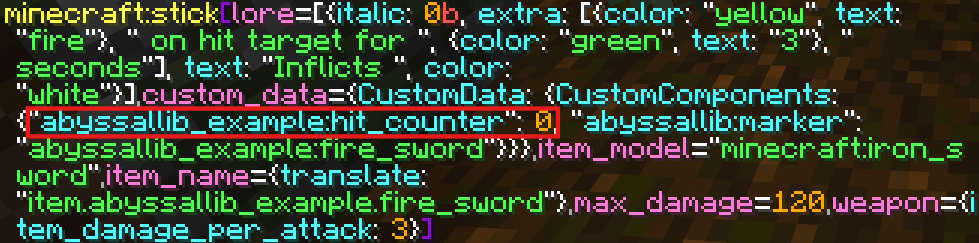
As you create more advanced items, you will inevitably need to store dynamic data directly on the item itself (like an item's level, owner, etc). For this AbyssalLib allows you to create custom DataComponents.
There are two primary types of Data Components:
Vanilla - API representations/wrappers of the vanilla game's native components (like ItemModel or MaxDurability).
Custom - Components added specifically by your plugin. These live under the minecraft:custom_data NBT tag behind the scenes.
Component API Methods
Before diving into creating custom components, it is helpful to know how to interact with them. The Item class provides a set of core methods to manage the Data Components attached to your items.
Method
Information
Return
setData(DataComponent<?>)
Applies the given DataComponent to the item. If a component of the same type already exists, it is overwritten.
void
getData(DataComponentType<T>)
Retrieves the DataComponent that matches the provided type. Returns the typed component (T), allowing you to safely read its value.
T
hasData(DataComponentType<T>)
Checks whether a DataComponent matching the provided type is currently attached to the item.
boolean
unsetData(DataComponentType<T>)
Removes the DataComponent matching the provided type from the item entirely.
void
Creating a custom data component
To start, you will need to extend the DataComponent<T> class, where T is the type of data you want to store.
Here is the basic blueprint:
public final class ExampleComponent extends DataComponent<String> { // Storing a String
public static final DataComponentType<ExampleComponent> TYPE = DataComponentType.simple(Codecs.STRING.xmap(ExampleComponent::new, ExampleComponent::getValue));
public ExampleComponent(String value) {
super(value);
}
@Override
public DataComponentType<ExampleComponent> getType() {
return TYPE;
}
}
For our example, we will make a HitCounter DataComponent that stores an Integer:
public final class HitCounter extends DataComponent<Integer> {
// We map the standard INT codec to our HitCounter class
public static final DataComponentType<HitCounter> TYPE = DataComponentType.simple(Codecs.INT.xmap(HitCounter::new, HitCounter::getValue));
public HitCounter(Integer value) {
super(value);
}
@Override
public DataComponentType<HitCounter> getType() {
return TYPE;
}
}
After making the component class, we must register the DataComponentType so the server knows how to properly load and save this data.
public final class DataComponents {
public static final DeferredRegistry<DataComponentType<?>> COMPONENTS = DeferredRegistry.create(Registries.DATA_COMPONENT_TYPES, AbyssalLibExample.PLUGIN_ID);
public static final DataComponentType<?> HIT_COUNTER = COMPONENTS.register("hit_counter", id -> HitCounter.TYPE);
}
Don't forget to call DataComponents.COMPONENTS.apply() in your onEnable()!
Testing the component in-game
Now that we have created and registered our DataComponent, let's apply it to an item. We will attach it to the FireSword we made in the Custom Item Interactions guide.
First, initialize the default value on the item inside its constructor:
public final class FireSword extends Item {
public FireSword(Key id) {
super(id);
setData(new ItemModel(NamespacedKey.minecraft("iron_sword")));
setData(new MaxDurability(120));
setData(new WeaponComponent(Weapon.weapon()
.itemDamagePerAttack(3)
.build()));
// Initialize our custom component with a value of 0
setData(new HitCounter(0));
createTooltip(tooltip);
updateTooltip();
}
// ... the rest of the class
}
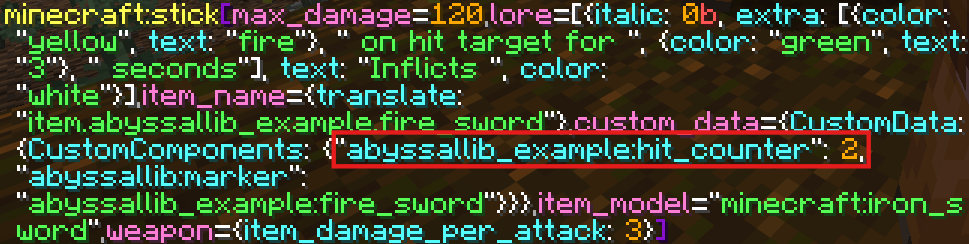
Next, we will intercept the onHit event to increment this value every time the player strikes an entity:
@Override
public ActionResult onHit(LivingEntity source, Entity target) {
// 1. Fetch the current component state
HitCounter counter = this.getData(HitCounter.TYPE);
// 2. Calculate the new value
int newCount = 1 + counter.getValue();
// 3. Apply the updated component back to the item
this.setData(new HitCounter(newCount));
target.setFireTicks(20 * 3);
return ActionResult.PASS;
}
Now load into the server, give yourself the item, and try hitting an entity. The data is safely persisting on the item stack!